AI Agents × Multi-Execution
A multi-session terminal built for Claude Code, Codex, and every CLI agent — with git, sessions, and pair-programming built in.
PATerminal's complete source code is public on GitHub. Read exactly what the app does, build it yourself, and confirm it sends no telemetry. View the source on GitHub
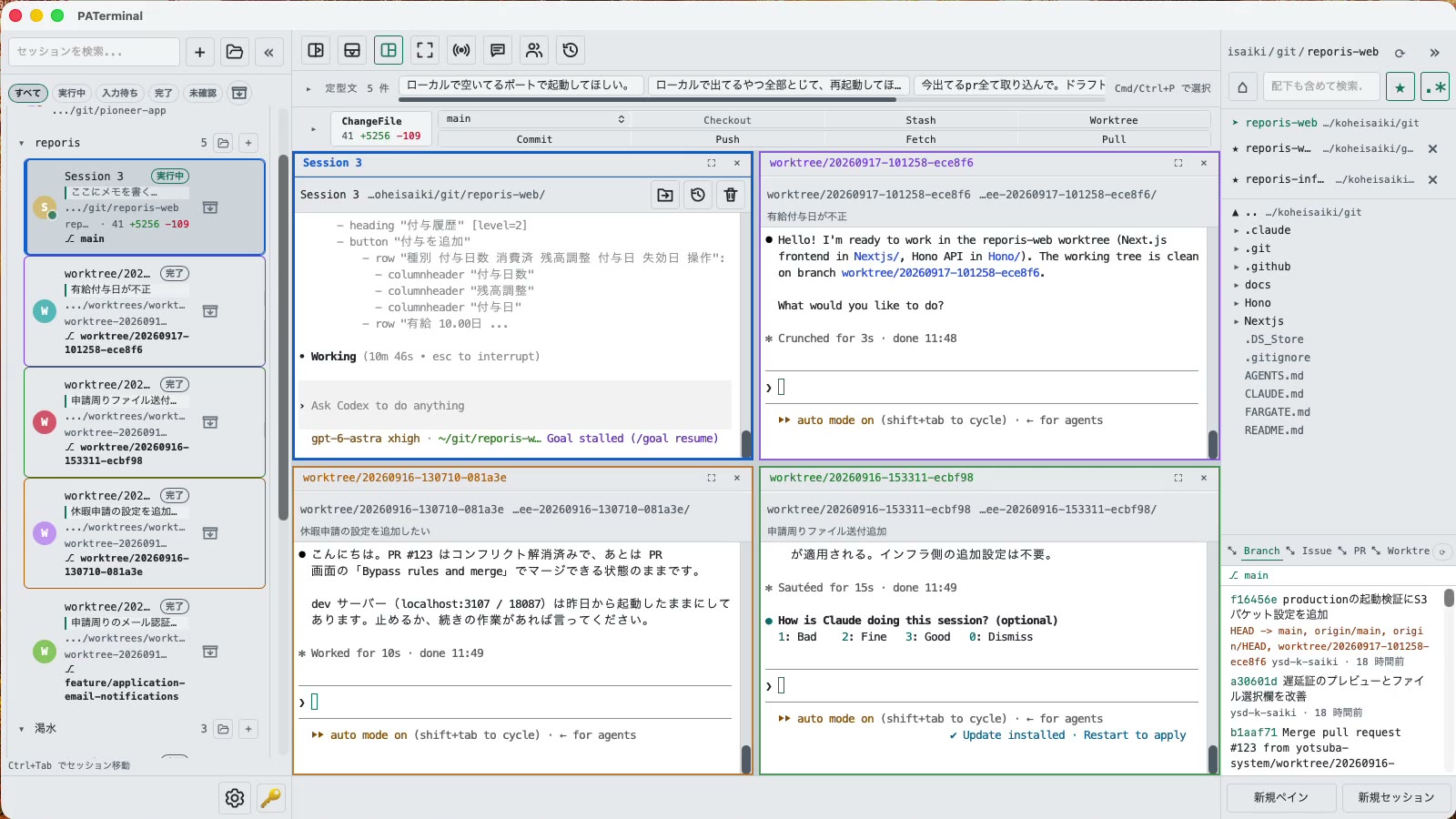
Built for people who run more than one agent
Everything you need to keep multiple CLI agents working at once — without losing track of any of them.
Parallel sessions
Give every task its own session with independent panes. Group them (with automatic colors), pin, tint, archive, and filter by status. Notes fill themselves from your first prompt, and everything — scrollback included — comes back after a restart.
Sessions side by side
Session split puts several whole sessions on one screen — side by side, stacked, or in a grid — each keeping its own panes. Drag a session from the sidebar onto a terminal's edge to add it.
Conversations survive restarts
claude and codex are detected and reopened with their saved conversation. Resume any past conversation in a new session, review every prompt you sent, and restore sessions you closed by mistake.
Pair mode
Implement × review, cross review, brainstorm, or brainstorm → build. Two agents hand work to each other on their official completion signals — you just watch.
Git in every pane
Each pane shows its branch, ahead/behind counts, and changes, with one-click Pull, Push, Commit, and Diff. The Git window (⌘E) adds file-level commits, a commit graph across all branches, and stash.
Worktrees, PRs & issues
Give each agent its own checkout: create a worktree from a branch or pull request, with .env and node_modules copied over. Read PR reviews and start a session straight from an issue.
See what every agent is doing
Every session shows running, waiting for input, or done — even off screen. Sessions you're not watching send a desktop notification when they finish or need you.
Broadcast input & quick phrases
Type once and send it to every session you pick. Save go-to prompts globally or per repository, and insert them with one click or ⌘P.
A folder browser in every pane
Click any pane's path bar to browse folders, move the terminal, copy paths, keep favorites, or drop files in from Finder. Running agents move with their conversation intact.
17 languages, 5 themes, zero telemetry
No analytics, no tracking — everything you type stays on your machine. Guided tours in the app walk you through each feature.
Download
Windows SmartScreen may show “Windows protected your PC” because the app is new. Click “More info”, then “Run anyway”. If you want to be sure, compare the SHA-256 below before opening the file.
Windows installation guide: verify your downloadOn first launch, macOS may ask you to confirm opening an app downloaded from the internet. Choose Open.
System requirements: macOS 11+ / Windows 10+
PATerminal's complete source code is public on GitHub. Read exactly what the app does, build it yourself, and confirm it sends no telemetry. View the source on GitHub
Review the End User License Agreement (EULA) before downloading and using PATerminal.
How PATerminal compares
Honest side-by-side notes against the terminals people ask about most, with the date each column was last checked.
PATerminal vs Windows Terminal
Windows Terminal is a great free shell host. PATerminal adds what you need to run several Claude Code or Codex sessions at once: agent status, conversation resume, notes, a git panel, and pair mode. Windows 10+ and macOS.
PATerminal vs Warp
Warp bundles its own AI agent and credits. PATerminal runs the CLI agents you already pay for (Claude Code, Codex and more) in parallel, with no account, no credits, and no telemetry. Windows 10+ and macOS.
PATerminal vs Orca
Orca is a free, open-source agent development environment built around one git worktree per agent. PATerminal is a lighter terminal with session organisation, conversation resume, and pair mode. Which fits your workflow on Windows or macOS?